

Take Project Estimation to the Next Level

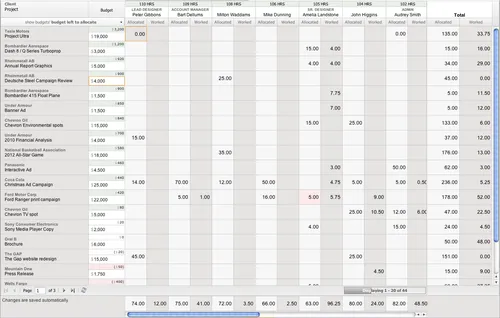
Many companies utilize project estimation within their business and ClickTime offers several ways to track project estimates. With the upcoming release of ClickTime 7.0 and our new Resource Planning application, we're taking project estimation to a whole new level.

Published – June 22, 2012
ClickTime

Table of contents

ResourcePlanning

Many companies utilize project estimation within their business and ClickTime offers several ways to track project estimates. With the upcoming release of ClickTime 7.0 and our new Resource Planning application, we're taking project estimation to a whole new level. You can now track monthly project budgets, assign people to projects and schedule their time each month based on each person's availability. Then, you can use our new Resource Planning management interface along with the new Company Dashboard to make sure your company is staying on track.

The new Resource Planning application provides great easy-to-use features so you can get organized and make sure your projects are getting completed as expected.

ClickTime
ClickTime
FAQs

Common questions

More insights from our team

Explore all insights

CapEx formula: How to calculate capital expenditure

Learn the CapEx formula to calculate capital expenditure from financial statements. Includes examples, CapEx vs OpEx differences, and impact on cash flow.

How to track employee time for grants at nonprofits

Learn how nonprofits can track employee time for grants, ensure 2 CFR 200 compliance, and create audit-ready records with effective time tracking software.

How to create a project budget that protects your margins

Learn how to create a project budget, track costs, and avoid overruns. A practical guide for project managers managing project profitability.

https://www.clicktime.com/blog/take-project-estimation-to-the-next-level