



1240+ Reviews
Resource Management

Staff projects with confidence, not guesswork

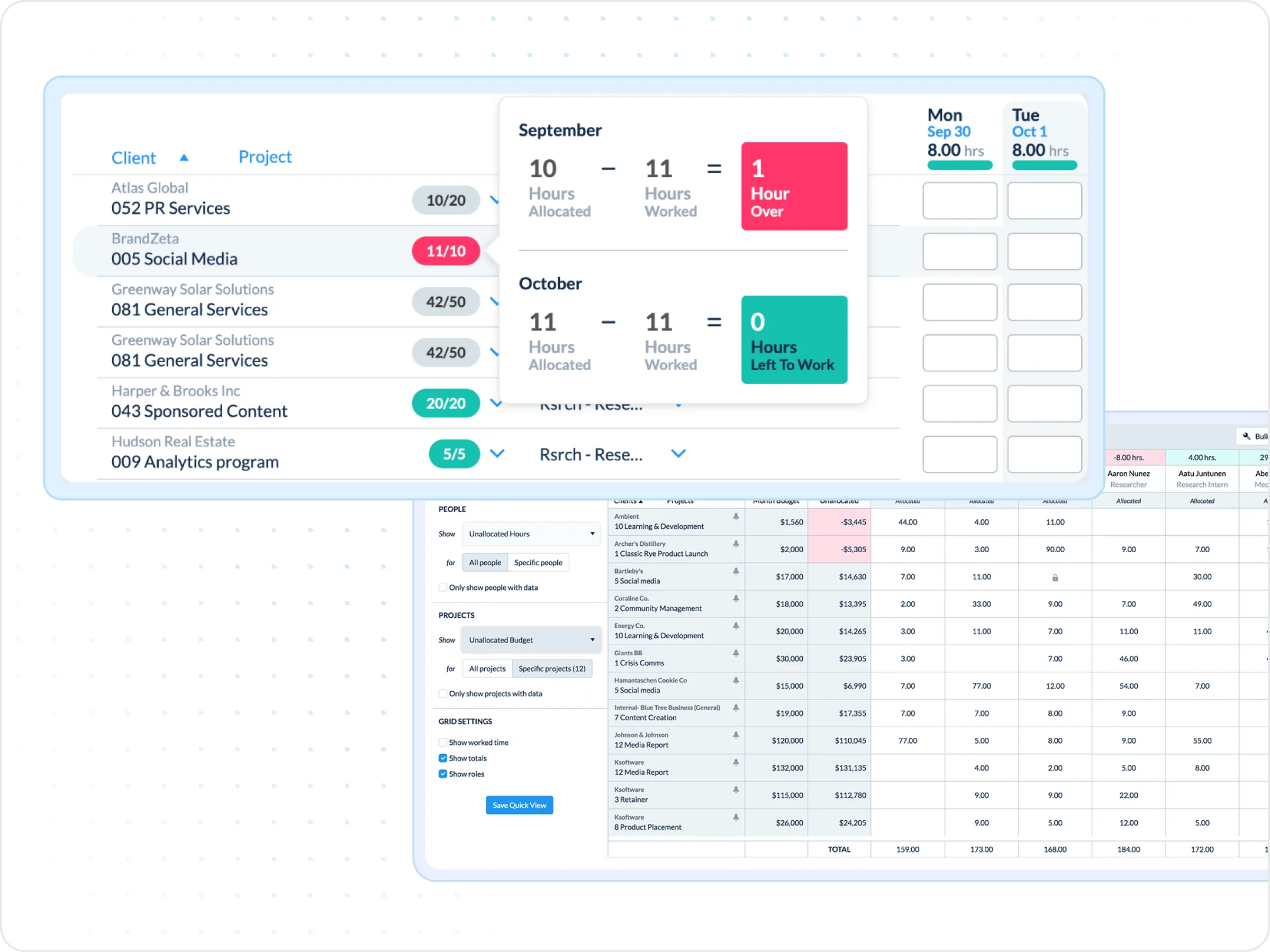
See who's working on what across every project. Balance workloads, track utilization, and connect staffing to budgets.

Get a demo
Trusted by thousands of companies of all sizes

One view of people, projects, and budgets

When staffing decisions live in spreadsheets and inboxes, visibility disappears. Managers don't know who's overloaded until deadlines slip. Finance finds out about budget overruns after the damage is done.

ClickTime brings people, projects, and budgets into one place. See allocations across your team in real time. Track utilization as work happens. And give everyone—from project managers to finance—the same view of how resources are being used.

Assignments flow directly to each team member's timesheet as individual goals. And because you can see your full staff base—including contractors—you're working with the complete picture.

Capabilities that connect people to projects

Resource management works best when it's connected to real time data. These features help you plan allocations, track progress, and keep projects on budget.

View all features
 

CapEx and OpEx labor tracking

Maximize tax benefits with automated CapEx/OpEx labor categorization


Enterprise time tracking

Scale time tracking organization-wide while maintaining data accuracy for complex operations

Learn more
 

Mileage tracking

Ensure accurate mileage reimbursements without manual tracking


Project budgeting

Protect margins and optimize financial performance with accurate, real-time project cost visibility

Learn more
 

Project health dashboard

Monitor project profitability in real-time to prevent overruns


Resource capacity planning

Plan capacity strategically to avoid resource scrambles

Learn more
 

Integrations and data exporting

Power your ERP, HRIS, and data warehousing with seamlessly integrated, verified labor data


Mobile timesheets

Never let timesheet approvals slow down payroll or billing with our mobile apps

Learn more
 

Reimbursement monitoring

Monitor reimbursement cycles for predictable cash flow management and optimized financial planning

Learn more
 

Real-time resource allocation

Allocate resources strategically with real-time budget visibility

Learn more
 

DCAA compliant timesheets

Protect government contracts with DCAA-compliant labor records

Learn more
 

Single Sign-On (SSO)

Ensure secure, compliant access and streamline IT management with enterprise-grade Single Sign-On (SSO)

Learn more
 

Time entry options

Configure time tracking to deliver the cost data your business needs

Learn more
 

Time sheet approvals

Ensure audit-ready financial records with robust, built-in timesheet approval workflows

Learn more
Protect margins on client work

Protect margins on client work

For client-facing projects, resource visibility is margin protection. Balance hours across engagements to prevent over-servicing and catch budget overruns before profitability erodes.

  • Real-time visibility into project burn rates
  • Rebalance staff between projects quickly
  • Track billable hours against budget targets
INTERNAL PROJECTS

Keep internal projects on budget

For internal initiatives—R&D, IT, product development—ClickTime tracks labor costs against budget so you catch overruns before they're surprises.

  • Track project costs against target budgets
  • Support efficient use of capital investments from the start 
  • Help managers communicate project status to finance easily
Integrations

Connect to the tools your team already uses

View all integrations

Sync with calendars, project tools, and HRIS systems. Allocations update as your team works, and time data flows into reporting without extra steps.

Smart Connect
Smart Connect
Smart Connect
Smart Connect
Smart Connect
Smart Connect
Smart Connect
Smart Connect
Integrations

Connect to the tools your team already uses

View all integrations

Sync with calendars, project tools, and HRIS systems. Allocations update as your team works, and time data flows into reporting without extra steps.

Smart Connect
Smart Connect
Smart Connect
Smart Connect
Smart Connect
Smart Connect
Smart Connect
FAQs

Will it work for my reports?

If you've been exporting to Excel to get the view you need, Report Studio was built for you.

See all FAQs
What is Resource Management?

Resource planning is the act of scheduling employee time and cost against a budget. Digital agencies, marketing firms, IT firms, consultants are all organizations that typically engage in employee resource planning.

Why plan employee resources?

Planning employee resources helps organizations increase profitability by reducing over-servicing, better managing project budgets, and gaining real-time visibility into employee capacity.

How does Resource Management work?

Resource planning provides a real-time window into employee availability and project budgets. As time is entered, budgets and available hours are automatically reduced. This is made possible by associating dynamic billing rates with specific employees, roles, projects, etc.

What is employee capacity?

Employee capacity is the total available hours for all active employees, minus any time off that has been scheduled

What is planned utilization?

Planned utilization is the number of allocated billable hours divided by the total allocated hours for an employee or group of employees.

How does Resource Management work for nonprofits?

Rather than measuring billable hours, nonprofit resource planning keeps track of hours worked on specific programs and activities that directly contribute to the mission (this can include fundraising, events, etc.)

Stop losing visibility into your largest expense

Book a demo
Ask a question

Stop staffing projects in the dark

Join thousands of teams who've moved staffing out of spreadsheets.

Book a demo
Ask a question