





1240+ Reviews
CLICKTIME AI

Every labor hour costs money. ClickTime AI follows both.

ClickTime AI maps every hour your team works to the project, cost category, and initiative that matters—to finance, to ops, and to the leaders making decisions with that data. Ask your data a question. Get an answer in seconds.

Get a demo
Trusted by thousands of companies of all sizes

Labor is your biggest expense. Most organizations can't tell you what it bought.

Finance knows the payroll number. What they can't answer quickly—or confidently—is where that spend went. Which clients absorbed the most hours? Which projects are over budget? Is time going toward what leadership actually prioritized?

40% of finance leaders don't trust their own labor cost data.2025 State of Labor Cost Management Report

ClickTime AI closes that gap—capturing labor data at the source, mapping it to the categories your organization actually uses, and making it answerable the moment a question gets asked.

No device monitoring

Reads work system outputs—Jira tickets, calendar events, project activity. Not browser history. Not keystrokes.

No cleanup for finance or ops

Every hour arrives already mapped to your cost structure—project, client, CapEx/OpEx, R&D-eligible work, or any category you define.

No report to build before the meeting

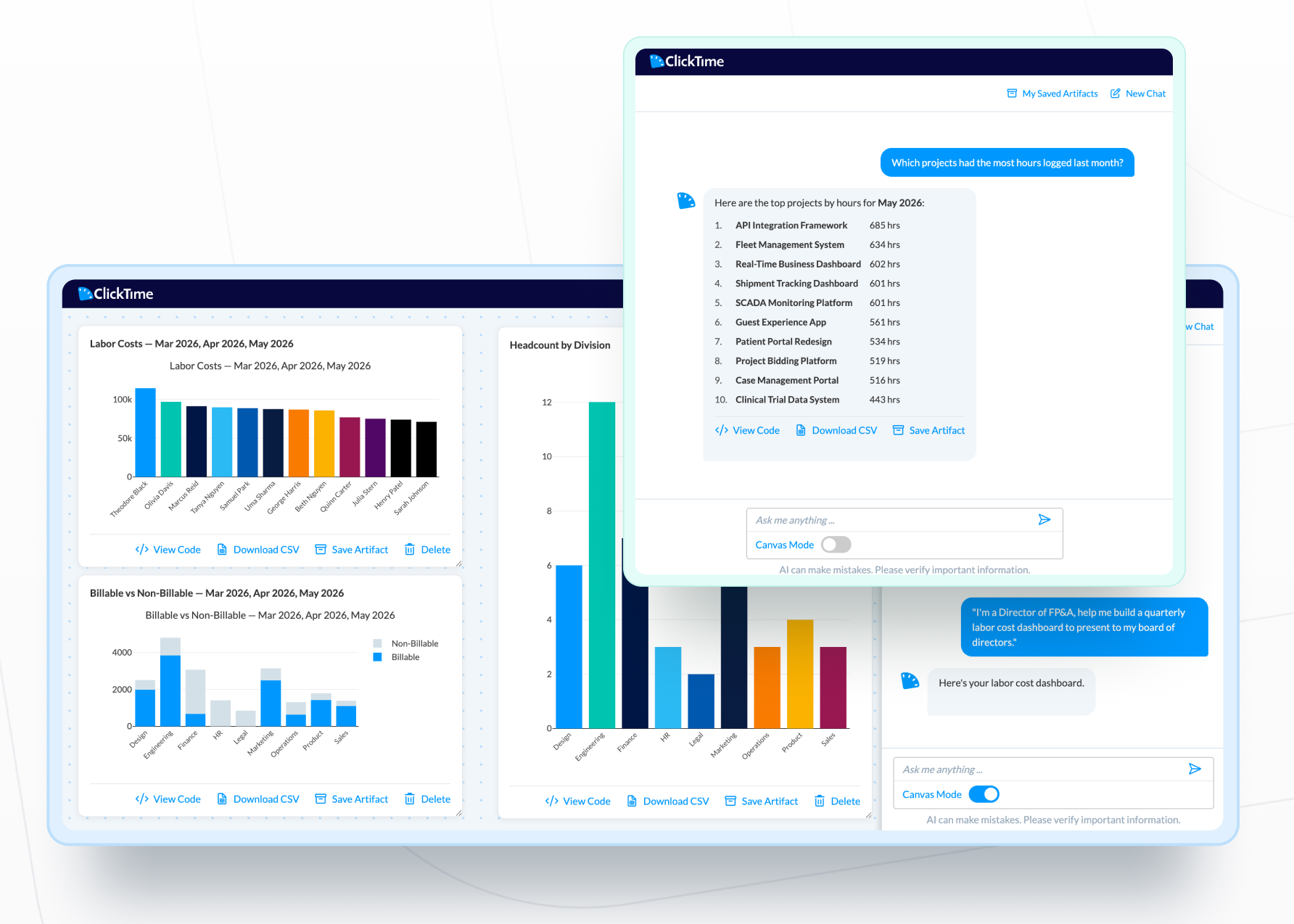
Ask your labor cost data a question. Get a clear answer in seconds, or a dashboard built on demand.

Every hour your team works, already mapped to the categories that matter.

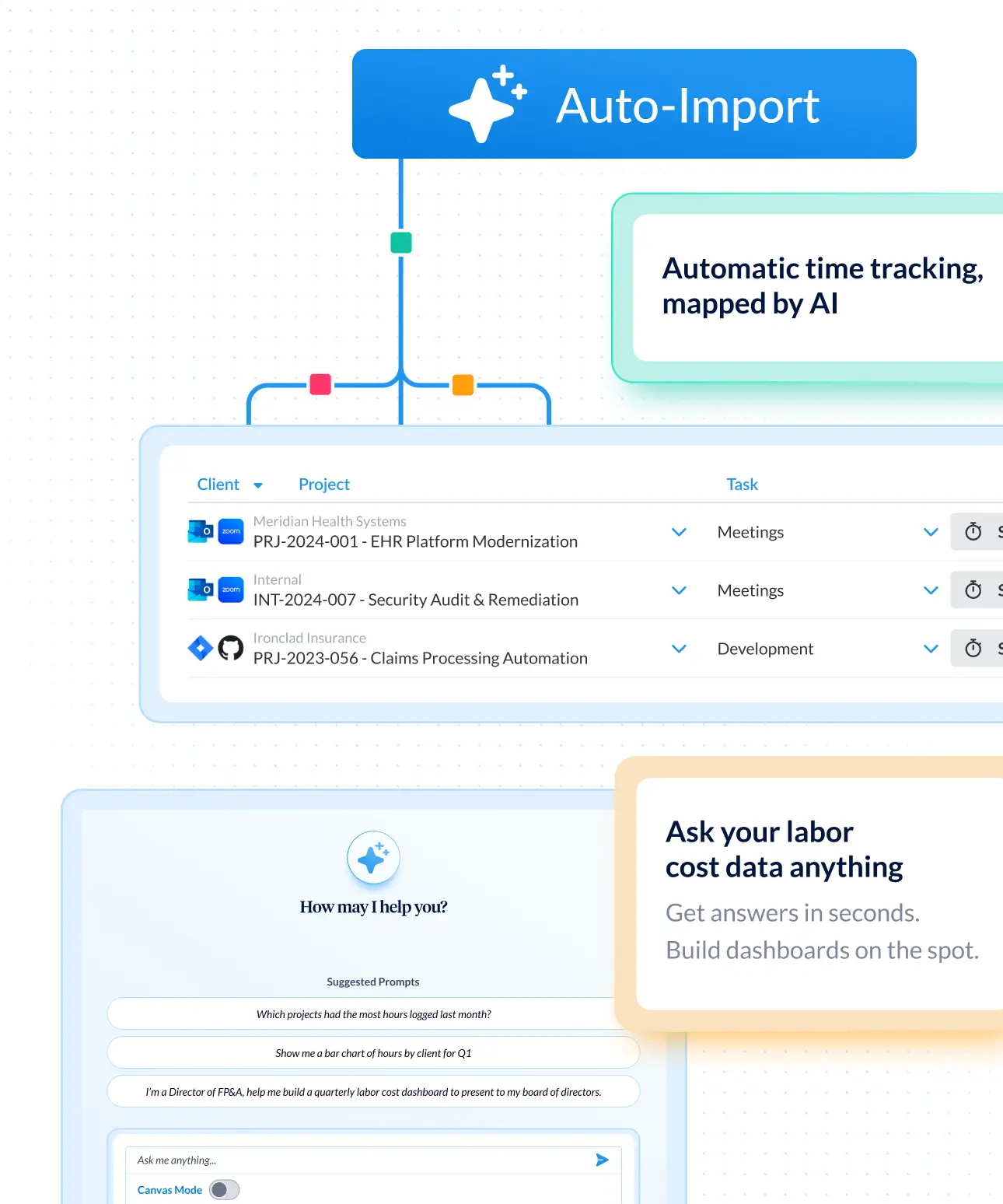
ClickTime AI reads the tools your team already works in—Jira, Google Calendar, Outlook—and turns that activity into categorized time entries. No new behavior required from employees. No decoding required from finance.

View all features
 

Automated tracker

ClickTime AI captures work activity from Jira, GitHub, Calendar, and Zoom—then maps it to GL codes, CapEx, OpEx, and R&D categories for finance-ready reporting.

Learn more
 

AI Time Tracking for Google Calendar and Outlook

ClickTime's AI time tracker turns Google Calendar and Outlook events into timesheet entries automatically. Review, approve, and submit — no manual re-entry, no missed hours.

Intelligent time tracking and mapping

Every hour your team works, already mapped to the categories that matter.

ClickTime AI reads the tools your team already works in—Jira, Google Calendar, Outlook—and turns that activity into categorized time entries. No new behavior required from employees. No decoding required from finance.

  • Employees spend seconds reviewing suggestions instead of hours coding timesheets from scratch—ClickTime AI cross-references multiple signals across your team's work history to surface the right match
  • "Project Green Tea" arrives in finance as the CapEx mobile app refresh it actually is—without anyone having to translate
  • Gets more accurate the more it's used, across the individual and the team

Answers and dashboards on demand

Ask your labor cost data anything. Get an answer before the meeting moves on.

When the margin question comes up in a client review or the budget question lands in a board meeting, ClickTime AI has the answer. Ask in plain language against your ClickTime data—time, labor costs, project burn, utilization—and get a clear response in seconds, or a dashboard built on the spot.

  • "Which clients have the lowest margin?" "Where did the engineering budget go?"—answered instantly, without building a report
  • Dashboards built on demand from a single ask—no configuration, no waiting on analytics
  • Surfaces the pattern underneath the data: the client eroding margins, the project burning budget without a flag—early enough to act

The foundation is live. Here's what comes next.

ClickTime AI takes action, not just answers

Today, ClickTime AI surfaces what's happening with your labor costs. What's coming next: you'll tell ClickTime AI what needs to change—a billing rate, a project, a client—and it will handle it. Insight to action, in the same conversation. On the roadmap

MCP integration Bring your verified ClickTime labor cost data into Claude and other AI tools that support MCP—answers available where decisions are already being made. Coming soon

Integrations

Reads the tools your team already works in.

View all integrations

No new behavior required. ClickTime AI connects to the work systems your team uses every day and feeds every entry into one verified, finance-ready labor cost record.

ClickTime AI
ClickTime AI
ClickTime AI
ClickTime AI
ClickTime AI
ClickTime AI
FAQs

Questions we get often about ClickTime

From basic time tracking to complex compliance needs

See all FAQs
Does ClickTime AI monitor my employees' computers or browsers?

No. It reads work system outputs—tickets closed, meetings attended, project activity in tools like Jira, Google Calendar, and Outlook. No device monitoring, no keystrokes, no background tracking. Employees see every suggestion before anything is submitted.

Do employees have to change how they work?

No. They keep working in the tools they already use. ClickTime AI generates timesheet suggestions from those outputs—reviewing takes far less time than coding from scratch.

How does ClickTime AI handle internal project names?

 Admins configure cost category mappings once. ClickTime AI applies them consistently—so "Project Green Tea" arrives in finance as the CapEx mobile app refresh it actually is.

How long does it take to get value?

Most teams see accurate, categorized time data within the first week. No lengthy implementation, no behavior change required.

Which plans include ClickTime AI?

AI time mapping is included on Team, Premier, and Enterprise plans. The AI chat interface and upcoming AI features are available on Premier and Enterprise. See full plan details →

Will this replace our existing reporting setup?

No—it works alongside it. The chat interface complements Custom reports and dashboards for on-demand questions.

Stop losing visibility into your largest expense

Book a demo
Ask a question

Your labor hours are going somewhere. So is the money. It's time to follow both.

Book a demo
Ask a question