



1240+ Reviews
Time Tracking Software

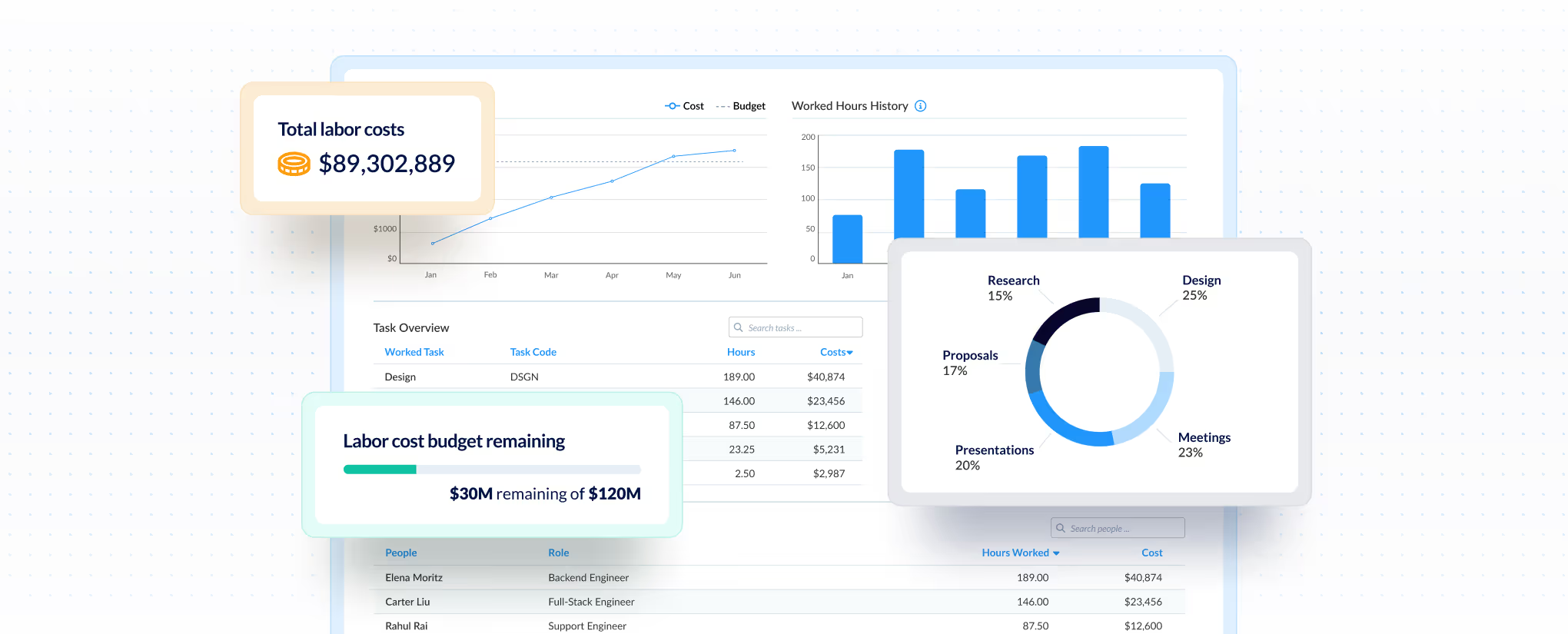
See exactly where your labor costs go

ClickTime captures time at the moment work happens—categorized by project, client, and cost type—so finance and ops leaders get the clean, verified data they need for billing, budgets, and compliance.

Get a demo
Trusted by thousands of companies of all sizes

Labor cost visibility starts with better time data.

Labor is your largest expense, but most organizations can't answer basic questions about it: Which projects are profitable? Where did the budget actually go? Is this data audit-ready?

The problem isn't tracking time. It's getting time data that's categorized, verified, and usable the moment it's captured—without finance spending hours cleaning it up.

ClickTime structures every hour by project, client, cost center, and work type at the point of entry. Built-in approvals verify the data before it hits your books. The result: labor cost visibility you can act on.

Finance-ready data

Every hour is categorized by project, client, and cost type at entry—no reconciliation needed

Audit-ready records

Built-in approvals and complete audit trails satisfy auditors and protect your compliance

Accurate capture

Calendar and app integrations map time to the right cost buckets without double entry

Capture time where work happens—already categorized.

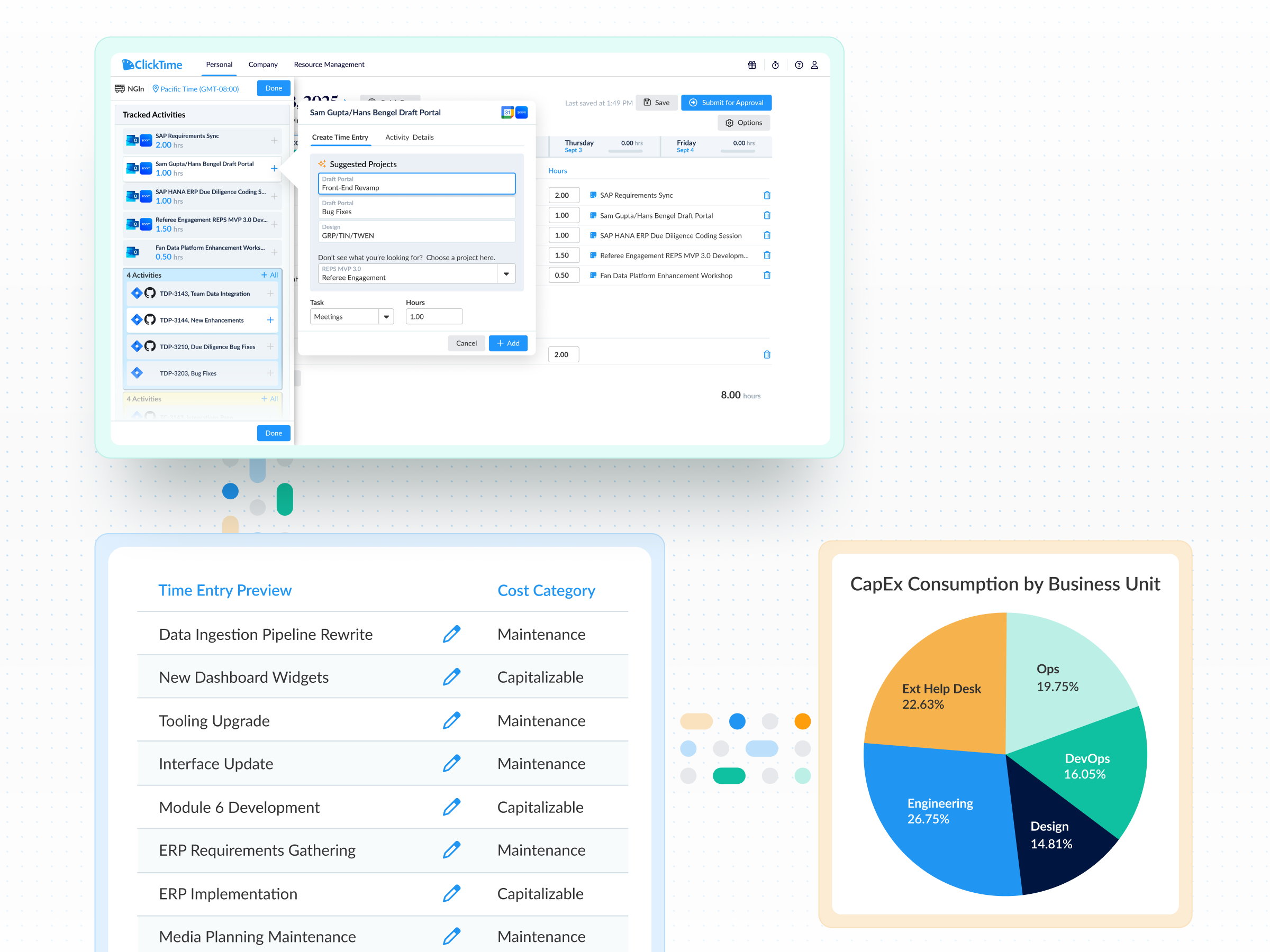
Calendar events and Jira activity flow directly into ClickTime, mapped to the right cost buckets automatically. No double entry, no miscoding, no chasing engineers for timesheets.

View all features
 

CapEx and OpEx labor tracking

Maximize tax benefits with automated CapEx/OpEx labor categorization


Enterprise time tracking

Enterprise time tracking that turns work hours into finance-ready data across teams, departments, and locations—with the controls large organizations require.

Learn more
 

Resource capacity planning

Plan capacity strategically to avoid resource scrambles

Learn more
 

Integrations and data exporting

Power your ERP, HRIS, and data warehousing with seamlessly integrated, verified labor data


Mobile timesheets

Log hours, capture expenses, and submit timesheets from any device. ClickTime Mobile syncs every entry to your labor cost reporting in real time.

Learn more
 

DCAA compliant timesheets

Protect government contracts with DCAA-compliant labor records

Learn more
 

Single Sign-On (SSO)

Ensure secure, compliant access and streamline IT management with enterprise-grade Single Sign-On (SSO)

Learn more
 

Time entry options

Configure time tracking to deliver the cost data your business needs

Learn more
 

Time sheet approvals

Ensure audit-ready financial records with robust, built-in timesheet approval workflows

Learn more
 

Connected Calendar

Google Calendar and Outlook events become timesheet entries with one click. Meetings, client calls, and focus time are captured accurately—not reconstructed from memory at month-end.


Jira integration

Developer activity translates directly into finance-ready labor cost data. Admins map Jira projects to cost centers, GL codes, and CapEx/R&D categories—engineers just work in Jira.


Org-wide visibility

However your teams track time—Jira, calendar, ClickTime’s native online timesheets and mobile—it all flows into one system. No gaps, no silos, no spreadsheet reconciliation.

"Since 2013, we've planned and run every billable hour through ClickTime for our entire staff of over 500 people."
Susan Canales
Finance Department, Allison Worldwide
Protect margins on client work

Data you can use without cleaning it first

Most time tracking tools give you a log of hours. ClickTime gives you labor cost data—structured by project, client, cost center, and work type at the moment of entry.

  • Custom fields map to your chart of accounts, cost centers, and billing codes
  • Cost rates auto-applied by person, role, or project type
  • Billable vs. non-billable, CapEx vs. OpEx, R&D-eligible—captured at entry, not reconciled later

According to recent research, 40% of finance leaders don't trust their own labor cost data. ClickTime solves this by structuring data at the source—so finance gets reliable inputs for budgets, billing, and reporting.

INTERNAL PROJECTS

Verified hours with a complete audit trail

Approval workflows ensure every timesheet is reviewed before it hits your books. When auditors or clients ask questions, you have the documentation to back it up.

  • Multi-level approval hierarchies that match your org structure
  • Full audit trail on every entry, edit, and approval
  • Lock periods to prevent retroactive changes after close

Nearly 23% of organizations have faced audit failures due to poor labor cost records. ClickTime's approval workflows and audit-ready documentation help you avoid becoming part of that statistic.

Grant compliance for non-profits

Time tracking that captures data in the moment

The best labor cost data comes from time captured when work happens—not reconstructed at month-end. ClickTime removes friction so employees submit on time and finance gets complete data.

  • Calendar events and Jira activity flow directly into ClickTime, mapped to the right cost buckets
  • Hours logged are mapped to finance categories without manual coding
  • Reminders keep timesheet submissions and approvals on track

With over 31% of organizations still relying on spreadsheets for complex labor cost tracking, the risk of errors and incomplete data runs high. ClickTime's integrations with tools your team already uses eliminate double entry and reduce miscoding.

Integrations

Connect your existing tools for complete time tracking

View all integrations

ClickTime integrates with the tools your team already uses—from project management platforms like Jira and Asana to calendar apps and accounting systems. Time flows into ClickTime mapped to the right projects and cost categories, so you get accurate labor data without asking employees to enter hours twice.

Smart Match
Smart Match
Smart Match
Smart Match
Smart Match
Integrations

Connect your existing tools for complete time tracking

View all integrations

ClickTime integrates with the tools your team already uses—from project management platforms like Jira and Asana to calendar apps and accounting systems. Time flows into ClickTime mapped to the right projects and cost categories, so you get accurate labor data without asking employees to enter hours twice.

Smart Match
Smart Match
Smart Match
Smart Match
Smart Match
Smart Match
FAQs

Will it work for my reports?

If you've been exporting to Excel to get the view you need, Report Studio was built for you.

See all FAQs
How is ClickTime different from basic time tracking tools?

Most tools give you a log of hours. ClickTime structures every entry by project, client, cost center, and work type—so you get finance-ready labor cost data, not a spreadsheet to clean up.

Will our team actually use time tracking software?

Yes. ClickTime offers multiple entry methods (automation through calendar and Jira integrations with Smart Match, and more on the way, ClickTime’s mobile app and web time tracker), pre-filled categories, and reminders. The whole ClickTime team uses the software we build everyday, so we make sure it’s simple and functional.

How long does implementation take?

Most teams are up and running within a few days, but some more complex organizations might take a few weeks. Our implementation team helps configure your cost structure, approval workflows, and integrations.

Does ClickTime integrate with our ERP/accounting system?

Yes. We integrate with leading systems including NetSuite, QuickBooks, Sage Intacct, and more. Data exports map directly to your chart of accounts.

Can ClickTime integrate into my existing billing or accounting system?
Exporting data & integration

Yes! ClickTime integrates with many accounting systems. See the full list on our Integrations page.

Can we import our data into ClickTime, for example, our employees and previous time data?
Pricing

We are able to import timesheet data on an as-quoted basis. Please contact our Sales Team for further information.

How do I demo ClickTime?

Glad you asked! Simply fill out our Demo Request Form, and we'll set up a time to walk you through ClickTime.

What is the best way to track your time for labor cost visibility?

The most effective approach captures time at the moment work happens, categorized by project, client, and cost type. ClickTime structures every entry with the financial context finance teams need—eliminating the manual cleanup that makes most time data unreliable.

How does time tracking improve budget accuracy?

When time is captured with proper cost categorization at entry, finance teams can compare actual labor spend against budgets in real time. This visibility helps catch overruns early and provides the verified data needed for accurate forecasting and resource planning.

What features should I look for in time tracking software?

Look for software that captures time with financial context (project, client, cost center), includes approval workflows for data verification, maintains a complete audit trail, and integrates with tools your team already uses. These features ensure the data is usable for billing, budgeting, and compliance without additional cleanup.

Why is time tracking important for audits?

Audit-ready time tracking provides documented evidence of labor costs tied to specific projects and cost categories. With built-in approval workflows and complete audit trails, organizations can demonstrate compliance and respond to auditor questions with verified records rather than reconstructed estimates.

Stop losing visibility into your largest expense

Book a demo
Ask a question