Smarter staffing starts with this capacity planning template
Resource capacity planning isn't just about filling out spreadsheets. It's about making sure the right people, with the right skills, are available when you need them—and understanding what that capacity costs your organization.
With our free capacity planning template, you can:
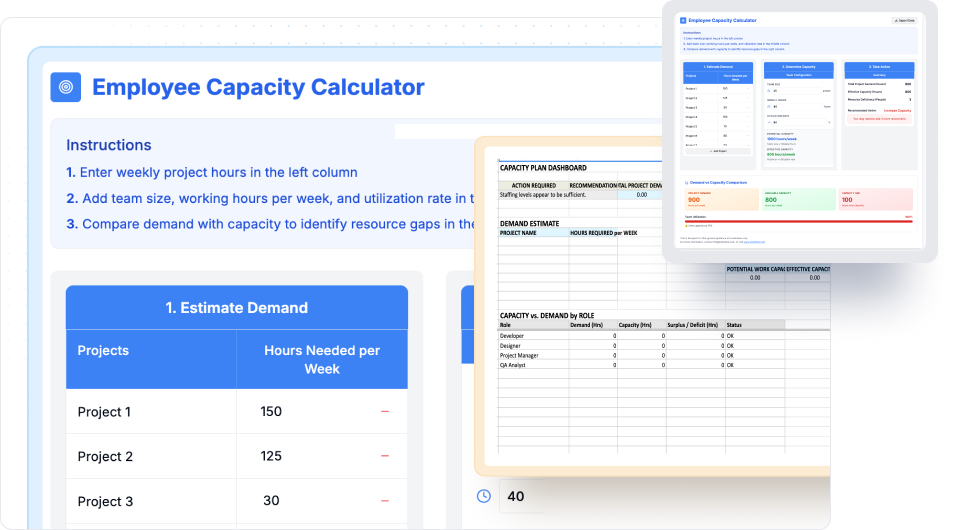
- Estimate project demand across weeks, roles, or team members
- Compare demand vs. available hours at the team level
- See immediately if you're over or under available capacity
- Get recommended actions—hire, reprioritize, or reallocate work, and track the right metrics for team capacity planning and resource allocation
This free capacity planning template gives you a snapshot. With ClickTime, you move from snapshots to real-time visibility across every project, role, and resource—with finance-ready data that connects work hours to actual labor costs.
What is capacity planning?
Capacity planning is the process of matching available employee work hours to the hours needed to deliver projects. Done well, it prevents burnout, reduces costs, and ensures deadlines are met. According to the Project Management Institute, effective capacity management is one of the top factors in project success.
Key elements include:
- Resource capacity: standard weekly hours, adjusted for utilization rate
- Team dynamics: vacation, employee leave, turnover, new team members ramping up
- Project demand: forecasted hours based on scope and complexity
Excel and Google Sheets templates give you a total capacity estimate. ClickTime integrates all of these factors automatically—building a system of record for resource planning that captures where time actually goes, not just where it should go.
What is a capacity planning template?
A capacity planning template is a structured document—typically in Excel or Google Sheets—that helps project managers and team leads track available resources against project requirements. Common formats include a project capacity planning template for scheduling work at the project level and a team capacity planning template for tracking workload and availability across people and roles.
A comprehensive capacity planning template should include:
- Team member roster with skill sets and availability
- Project timeline with estimated hours per resource
- Utilization rate calculations showing actual vs. target capacity
- Resource gaps highlighted automatically with color-coded indicators for overloaded and underused work
- Workload distribution across the project team
The capacity planning template takes the guesswork out of resource management by giving you clear visibility into resource availability, helping you balance workloads and match resources to project requirements before overallocation causes burnout or delays.
Who should use a capacity planning template?
The free capacity planning template for Excel is a great starting point. But if you're responsible for real budgets, utilization goals, or meeting deadlines for projects, and need help with managing capacity across business teams, ClickTime is built for you:
- Project managers balancing multiple project deadlines: Use the template to plan capacity for upcoming work and understand the team's bandwidth before committing to project work. Use ClickTime for calculating resource capacity, monitoring utilization in real-time, reallocating hours instantly, and avoiding project overruns.
- Team leads trying to prevent burnout: The capacity planning template shows weekly workload gaps. ClickTime continuously tracks team availability and sends alerts, enabling timely adjustments before team members hit breaking points.
- Finance and operations leaders forecasting labor costs: The template estimates hours. ClickTime connects those hours directly to budgets, CapEx/OpEx allocations, and client billing with audit-ready accuracy. This matters because 50.1% of organizations experience budget overruns from improper labor cost tracking.
- Human resources teams managing workforce planning: Use this template to identify resource requirements and forecast capacity needs. ClickTime provides the historical data HR needs for strategic headcount decisions and to forecast future resource requirements.
How the capacity planning template works
Estimate project demand, set your team's capacity, and spot resource gaps instantly.
1. Enter project hours — Add weekly hours needed for each project in the spreadsheet.
2. Set team capacity — Input team size, working hours, and target utilization rate.
3. Compare results — See if your team's workload is over or under capacity; automated capacity calculations make it easier to compare demand and capacity as priorities shift.
A manual resource capacity planning spreadsheet can save time, but a digital resource capacity planning template gives you real-time updates for better adaptability. With ClickTime, you can take it further—track time continuously, monitor utilization across teams, and forecast with live, audit-ready dashboards that keep every project on track.
Why historical data matters for effective capacity planning
A one-time calculation shows you today's balance. Historical data analysis reveals patterns where your team was overbooked, underutilized, or spread too thin—insights that reduce poor forecasting and support stronger resource forecasting for more accurate future planning.
Yet 31.8% of organizations still rely on spreadsheets for complex labor cost tracking, missing the visibility that comes from continuous data capture. ClickTime captures and calculates this automatically, creating a complete record with minimal effort (and you can read more about our trust and security).
Key data points to track:
- Project hours and utilization over time
- Resource allocation patterns per resource and project
- Trends that help forecast demand and support data driven decisions
By analyzing historical data, organizations can identify patterns and more accurately forecast resource needs for future projects, helping leaders make informed decisions about future staffing and resource allocation while optimizing the planning process to avoid delays and protect margins.
What are the different types of capacity planning?
Understanding the three main types of capacity planning helps you choose the right approach for your organization: common capacity planning strategies also shape how teams time resource changes against demand, including lead, lag, match, and adjustment approaches. Lead strategy adds capacity before demand rises; lag strategy adds capacity after demand increases; match strategy makes small incremental changes as demand shifts; adjustment strategy continuously fine-tunes resources using real-time data.
- Workforce capacity planning: Focuses on human resources—ensuring you have the right team members with the right skill sets available when needed. This is what most capacity planning templates address.
- Product capacity planning: Used in manufacturing and production environments to match production capacity to demand.
- Tool capacity planning: Ensures you have adequate equipment, software licenses, and infrastructure to support project delivery.
For professional services, consulting, and knowledge work, workforce capacity planning delivers the highest impact. The free template below focuses on this approach—helping project managers match available resources to project requirements.
Best practices for using a capacity planning template
Effective capacity planning prevents project delays and cost overruns. Get your resource allocation right and plan resources with these practices:
- Centralize resource data: Put all resource information—skill sets, team availability, utilization—in one platform, with integration to calendar systems to keep availability current. Clean data means accurate capacity calculations and faster decisions.
- Analyze historical data: Review past projects to spot resource patterns. This prevents shortages that delay project delivery and surpluses that waste budget.
- Use real data, not estimates: Base capacity decisions on actual numbers. Over half (51%) of organizations rely on leadership estimates for labor allocation—a practice that leads to missed deadlines and budget overruns.
- Account for constraints: Factor in time off, holidays, and operational limits when calculating team capacity, and aim for 70-85% utilization to prevent burnout. This shows true availability and prevents over-commitment.
- Update plans regularly: Capacity planning is ongoing work. Regular updates keep projects on schedule and budgets on track.
These practices deliver projects on time and protect margins. For organizations ready to move beyond spreadsheets, resource management software like ClickTime automates these best practices.
Common capacity planning mistakes to avoid
Teams lose money when capacity planning goes wrong, and poor workload visibility raises burnout risk—70% of employees are more likely to burn out without workload visibility—and can make projects slip. Stop these mistakes before they hurt your bottom line:
- Skipping data reviews: Teams that ignore historical data make poor capacity calls. This wastes budget and misallocates available resources.
- Missing team realities: Forget about vacation days and holidays, and you overbook people. This kills productivity and burns out your project team.
- Breaking communication: When stakeholders work from different numbers, projects miss deadlines. Project resources get wasted. Revenue gets lost.
- Using broken tools: Outdated spreadsheets create errors, create blind spots when priorities change, and eat up planning time. This slows decisions and costs money.
- Ignoring changes: Stick to old plans when project scope shifts, and you end up with too many people or too few. Projects fail either way.
Fix these problems and better visibility helps teams avoid burnout and keep delivery on track. Real-time visibility into workloads improves project delivery rates, while your budget stays intact and your people stay productive.
Business benefits of effective capacity planning
A capacity planning template to improve project outcomes through better resource allocation delivers clear advantages for multiple teams and the entire organization:
- Better resource use: Match resources to demand. Reduce idle time. Maximize output per resource.
- Higher productivity: Allocate project resources right. Teams focus on high-value work. Productivity rises and team performance improves.
- Project success: Plan capacity accurately. Meet deadlines. Avoid overruns and protect project timeline commitments.
- Smarter decisions: Visibility into workload and availability supports informed decisions with data, not guesswork.
- Lower costs: Avoid over-allocation and under-allocation. Control costs. Protect margins, especially when the ideal utilization rate is 70-85%.
- Client satisfaction: Meet deadlines. Deliver quality work. Keep clients happy.
Capacity management drives efficiency, project success, and competitive advantage—especially when backed by finance-ready data that connects resource decisions to financial outcomes.
Capacity planning templates for remote teams
Distributed teams create new challenges: remote work introduces complexity from time zones, coordination issues, shifting priorities, and limited cross team visibility that affect team's workload and availability.
The template highlights workload gaps. ClickTime gives you real-time visibility into distributed teams so you can:
- Spot overloads instantly across geographies
- Reallocate work based on actual team availability
- Keep project delivery on track while keeping people aligned with the team's goals
- Manage capacity across departments and time zones
For remote and hybrid teams, static resource planning templates quickly become outdated. Continuous tracking provides the real-time insights distributed project teams need, especially across the product development process when work spans remote functions.
Capacity planning template for Excel vs. resource management software
Both approaches have their place. Here's when to use the template and when to upgrade, with the key differences between spreadsheets and software coming down to usability, collaboration, and scalability:
Use the free capacity planning template when:
- You're start planning with a resource capacity planning spreadsheet for a single project or small team
- You need a quick snapshot of capacity needs
- Your project requirements are relatively stable
- You're evaluating whether formal capacity management makes sense
Upgrade to ClickTime when:
- You manage multiple projects with competing resource needs
- You need real-time visibility into team's capacity and utilization
- Finance requires audit-ready records of labor allocation
- You want to connect capacity planning to actual labor costs
- Manual spreadsheet updates consume too much time
- You need calendar integrations alongside your planning data
The template also works as a bridge—use it to establish your planning process, then migrate to ClickTime when you need continuous visibility and finance-ready reporting.
Why upgrade from templates to ClickTime?
The capacity planning template is a quick check. The Excel and Google Sheets versions are good starting points. But ClickTime is the full solution for checking capacity and managing resources at scale:
- Real-time visibility into demand, capacity, and resource utilization
- Audit-ready data across CapEx, OpEx, and client billing
- Forecasting tools to prevent overruns and protect margins
- Role- and project-level insights to guide hiring and prioritization
- Dashboards, alerts, and historical records that help teams make data-driven decisions across changing demand
- Manage project timelines and ensure smooth project starts with continuous capacity tracking
Only 47% of organizations can forecast future project costs effectively. ClickTime provides the labor cost visibility that closes this gap—turning capacity planning from periodic guesswork into continuous, data-driven resource management, with software that supports multiple teams more effectively than static templates.
Start your free 30-day trial and see how ClickTime turns your capacity planning template into a living system of record.