



Time tracking that fits how teams actually work

Capture work hours from anywhere—desktop or mobile—without breaking financial structure.

Get a demo
Trusted by thousands of companies of all sizes

Time tracking has never been easier

For many organizations, capturing employee time is harder than it should be. The right approach needs to work for employees, support operational oversight, and connect cleanly with the tools teams already use every day.

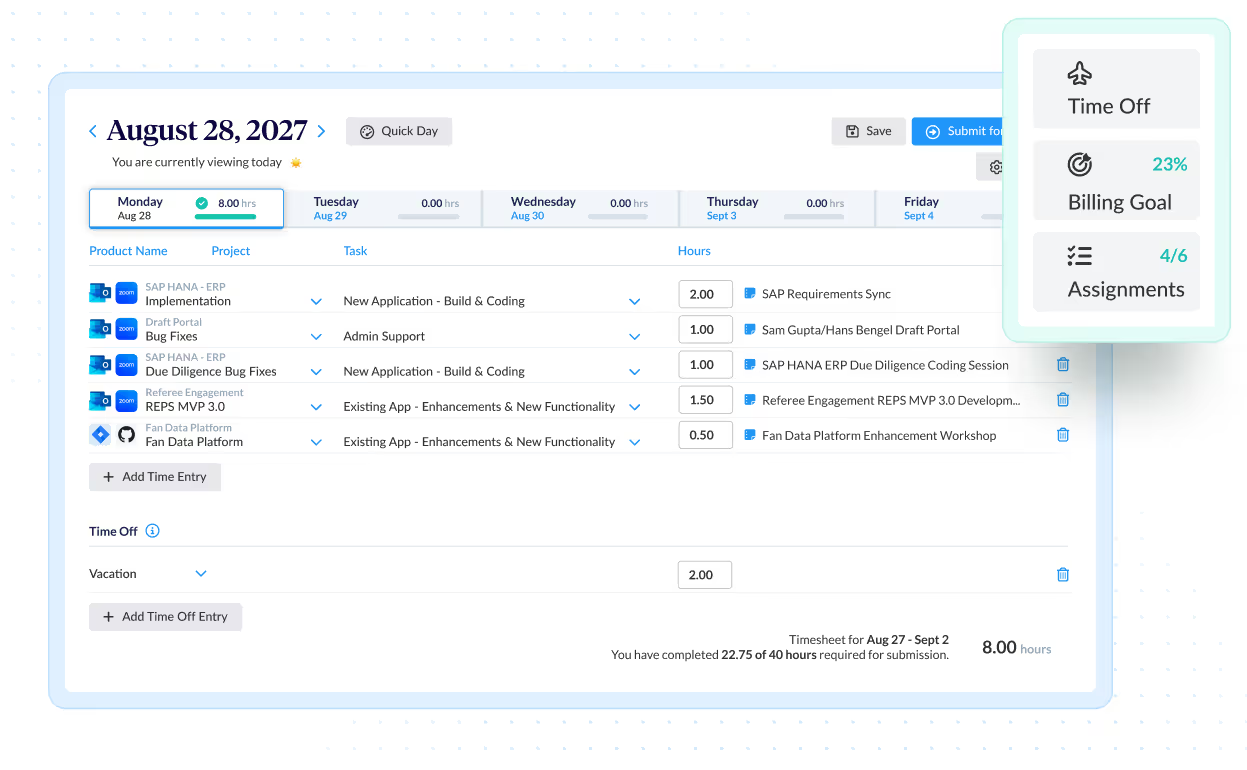
Employees can enter time daily, weekly, or with supporting notes. Assisted connections can be enabled to surface relevant activity from tools like Google Calendar, Outlook, Jira, Zoom, and GitHub to help suggest time entries.

Suggested entries support faster, more accurate submission while keeping employees in control. All entries move through existing approval workflows, ensuring hours are consistently categorized and ready for reporting.

Time entry notes

A valuable way to remember what you worked on and when. Add context to every hour—notes attach directly to time entries so work stays clear, traceable, and easy to review.

Daily and weekly time entry

Choose the entry view that fits your workflow. Employees can record time day by day or enter hours by the week—while consistent categorization is maintained across all entries for clean reporting.

Designed for how work actually happens

Employees can track time from desktop or mobile, with smart timesheets that surface relevant projects and make it easy to enter, copy, or adjust hours. Reporting turns submitted time into immediate visibility for finance and operations.

  • iOS and Android apps for time entry on the go
  • Smart timesheets that surface relevant projects
  • Built-in reporting for real-time visibility
  • Integrations with accounting, CRM, and payroll systems
Try it now

Faster entry for repeatable work

Reduce the time spent completing timesheets for routine schedules without sacrificing consistency or reviewability. Auto-Fill carries forward recently used projects and tasks, while Quick Week and Quick Day let users copy prior entries when work repeats.

  • Auto-Fill pre-populates commonly used projects and tasks
  • Quick Week copies a full prior week when schedules repeat
  • Quick Day speeds entry for similar daily work
Get started

Timesheets tailored to your business

Timesheets can be configured to reflect how your organization tracks work. Adjust terminology, show or hide weekends, and add custom fields to capture the information needed for reporting, cost allocation, or compliance. Time can be entered using the method that best fits the work being done, while maintaining consistent structure across entries.

  • Custom terminology and weekend visibility
  • Custom fields for project or cost detail
  • Stopwatch for real-time tracking
  • Start and end times or total hours entry
Get started
Integrations

Purpose-built for labor cost data, not pieced together

View all integrations

Every entry includes approval workflows, complete change history, and instant reporting. Whether it's R&D tax credits, client billing disputes, or grant compliance, you have defensible records without scrambling through spreadsheets or Jira logs.

Smart Connect
Smart Connect
Smart Connect
Smart Connect
Smart Connect
Smart Connect
Smart Connect
Smart Connect
Integrations

Connect with the tools you use

View all integrations

Time tracking software that can be connected with the other software and tools you use every day.

Smart Connect
Smart Connect
Smart Connect
Smart Connect
Smart Connect
Smart Connect

Feature FAQs

What is a Time Entry System?

A time entry system allows for employees to log work hours so an employer can improve overall business efficiency. Many businesses use time entry systems to create records of the time spent on projects, clients, or tasks.

How Can I Record an Employee’s Time?

At ClickTime, we believe that data is only as good as what’s entered into the system. So it’s vital that employees have the easiest time entry tools at their disposal. ClickTime’s robust time tracking platform gives employees multiple ways to clock in and out, manage paid time off, and integrate with payroll services.

What Are Common Methods of Timekeeping?

Methods of time tracking have become more sophisticated and complex with every technological advancement. Below is a brief look at this fast progression:

  • Paper Entries – The most basic method of tracking time is by creating handwritten paper entries. These are easily done, but the drawbacks are significant. Paper entries need to be stored in a physical location, scanned in order to be shared, and can be lost or damaged easily.
  • Excel Spreadsheets – Excel spreadsheets enable employees to manually enter time worked on projects and share them with managers. However, each time entry is still very much a manual task, and spreadsheets often become unwieldy. Reporting features are possible in Excel, but often require complicated formulas and pivot tables.
  • Project Based Timesheet Software – These platforms work well because they are scalable, streamline the timesheet approval process, and are typically based in the cloud, thereby offering vital security safeguards.
How Can I Track Time in Google Calendar?

No one likes to spend their time filling out timesheets. That’s why we’ve built an integration with Google Calendar. We’ve made it easy for you and your team to automatically record any meetings or other events scheduled in Google. Time entry in GCal is the most effective way to ensure that employee hours are recorded quickly and accurately.

How Can I Track Time from Slack?

Track time without going to your timesheet, straight from Slack. See your current week time entry completion and add or delete time entries to ClickTime.

Learn more about the Slack Time Tracking Integration

Stop losing visibility into your largest expense

Book a demo
Ask a question