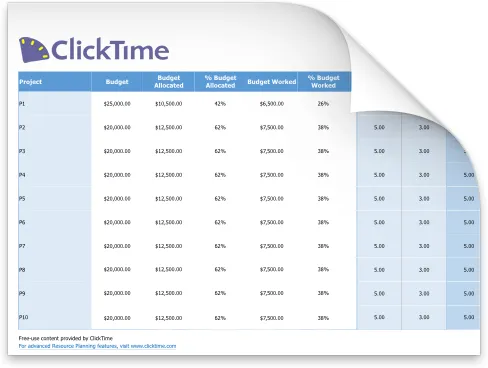
Free resource planning template
When labor is your largest expense, knowing where every hour goes isn't optional—it's essential. A resource planning template helps you allocate team members to projects, balance workload across your organization, and keep projects on time and on budget.
Download our free resource planning template below, or keep reading to learn how to use a resource plan template effectively—and when spreadsheets fall short.
What is a resource plan?
A resource plan documents which team members will work on which projects, for how many hours, and over what timeline. It answers the fundamental question every project manager faces: do we have the right people available to complete this work?
Effective resource planning connects three elements:
- People: Who has the skills and availability for each project task?
- Time: How many work hours does each deliverable require?
- Budget: What will this labor allocation cost, and does it fit within project constraints?
Without a solid plan, organizations face resource availability conflicts, missed deadlines, and budget overruns. According to recent research, 50.1% of finance leaders have experienced budget overruns from improper labor cost tracking—a problem that starts with poor resource planning.
How to use this resource planning template
Our free resource planning template for Excel and Google Sheets helps you plan resources across multiple projects. Here's how to get started:
Step 1: List your team members and their capacity
Enter each team member's name, role, and available hours per week. This establishes your resource capacity baseline—the total hours you can allocate before anyone becomes overloaded.
Step 2: Add your projects and timelines
For every project, document the start date, end date, and project schedule. The template will help you visualize resource needs across your project timeline.
Step 3: Assign team members to project tasks
Allocate specific hours from each team member to each project. The spreadsheet calculates utilization automatically, showing you who has capacity and who's at risk of burnout.
Step 4: Monitor workload and adjust
As projects progress, use this template to track resource utilization and rebalance assignments. When resources are available, you can take on new work. When team capacity is stretched, you'll know to push back on scope.
What does a resource plan template include?
A good resource allocation template helps project managers answer critical questions about staffing and budget. Our template gives you:
- Team roster with capacity: Track each team member's total available hours and current assignments
- Project allocation grid: See how hours are distributed resources across projects at a glance
- Utilization calculations: Automatic formulas show workload percentage for every resource
- Timeline view: Visualize resource scheduling across weeks or months
- Budget tracking: Connect hours to labor costs for project planning
Whether you're managing a single project or coordinating resources across multiple initiatives, the template provides an overview of your team's commitments and availability.
Benefits of using a resource planning template
Templates make resource management accessible without specialized software. Here's why project managers rely on them:
Prevent overallocation: When you can see every team member's workload in one place, you avoid assigning people to more work than they can handle. This reduces burnout and keeps projects on track.
Improve project estimates: Historical data from your resource plan helps you estimate future projects more accurately. You'll know how long similar work actually takes.
Support budget conversations: A resource allocation template connects hours to dollars. When stakeholders ask why a project costs what it does, you can show exactly where the labor budget goes.
Enable capacity planning: Before committing to new work, check your capacity planning template to confirm you have the team members available to deliver.
Who uses a resource plan template?
Resource planning templates serve different roles across an organization:
- Project managers use them to assign tasks, monitor progress, and keep every project on time
- Resource managers use them to balance workload across teams and plan resources for upcoming initiatives
- Finance leaders use them to understand labor cost allocation and project resource requirements
- Operations directors use them for capacity planning and ensuring that projects have adequate staffing
In professional services firms, resource planning directly impacts profitability. Every hour a consultant spends on non-billable work is revenue lost. A structured approach to resource management helps firms maximize utilization while maintaining quality.
How to do resource planning in Excel
Many organizations start with Excel or Google Sheets for resource planning. Here's a straightforward approach:
Create your structure: Set up columns for team member names, roles, and weekly capacity. Add rows for each project or project phase.
Build allocation formulas: Use SUM functions to calculate total assigned hours per person. Compare this against their capacity to calculate utilization percentage.
Add conditional formatting: Highlight cells that indicate overallocation (utilization above 100%) or underutilization (below 70%). This makes workload imbalances visible at a glance.
Maintain regularly: An Excel template only works if you keep it current. Schedule weekly updates to reflect actual hours worked and adjust future allocations.
This manual approach works for small teams, but becomes difficult to maintain as your organization grows. Spreadsheets lack real-time updates, making resource availability data unreliable for agile environments where priorities shift quickly.
What are the drawbacks of resource planning templates?
While templates help you plan resources initially, they have significant limitations for ongoing resource management:
No real-time visibility: Spreadsheet data is only accurate at the moment someone updates it. You can't see where hours are actually going without manual data collection.
Disconnected from actual time: A resource plan shows where time should go. Without time tracking integration, you can't compare planned allocation against reality.
Difficult to scale: Managing team resource assignments across multiple projects in Excel becomes unwieldy. Formulas break, versions conflict, and maintaining accuracy requires significant administrative effort.
Limited reporting: Templates can show you current state, but generating historical analysis or forecasting future capacity requires building custom reports from scratch.
Research shows that 31.8% of organizations still rely on spreadsheets for complex labor cost tracking—but those same organizations report lower confidence in their data and higher rates of budget overruns.
A better way to plan your resources
When spreadsheet limitations start costing you time and accuracy, purpose-built resource management software provides capabilities that templates can't match:
- Real-time resource availability: See current utilization based on actual tracked hours, not estimates
- Integrated time tracking: Compare planned allocations against where work hours actually go
- Finance-ready reporting: Generate labor cost reports that connect operational data to financial outcomes
- Audit-ready records: Maintain documentation that satisfies compliance requirements
The goal isn't just to plan resources—it's to understand where every hour goes, what it costs, and whether that allocation delivers value. That requires moving beyond static templates to systems that capture how work actually happens.
What are the five steps of resource planning?
Whether you use a template or dedicated software, effective resource planning follows these stages:
- Identify resource requirements: Document what skills, roles, and hours each project needs to succeed
- Assess resource availability: Understand your current team capacity and existing commitments
- Allocate resources: Assign team members to projects based on skills, availability, and project priority
- Monitor utilization: Track whether allocations match reality and adjust as project needs change
- Analyze and improve: Review completed projects to refine future resource estimates
The template is designed to help with steps 1-3. Steps 4-5 require ongoing data collection—which is where many spreadsheet-based approaches fall short.
Download the free resource planning template
Ready to improve how you plan and manage team resources? Download our free resource planning template for Excel or Google Sheets. The template will help you document team capacity, allocate project resources, and identify workload imbalances before they become problems.
For organizations ready to move beyond spreadsheets, explore ClickTime's resource management capabilities to see how real-time data can improve your resource planning efforts.